
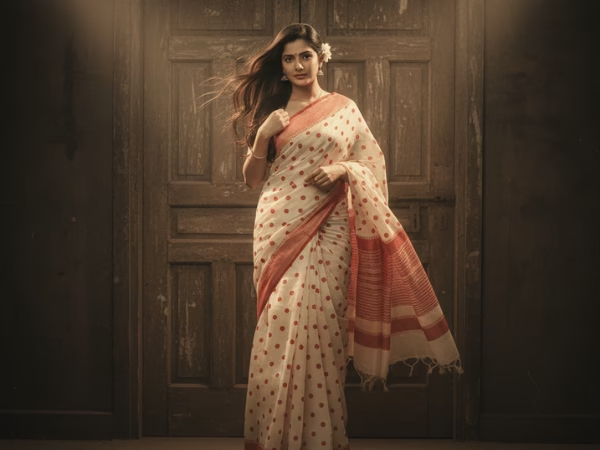

The Google Gemini AI saree trend is about using Gemini and creative prompts to make stylish photos of sarees. Gemini lets you make AI saree images in just a few steps, from old-school Bollywood looks to new silk sarees.
When the “AI Saree Trend” created with Google Gemini started making waves on social media, it was everywhere, AI-generated women draped in colorful sarees, realistic lighting, and cinematic backdrops. But beyond the viral buzz, we wanted to find out: How does Google Gemini actually perform with Indian fashion prompts? So, we decided to test it ourselves.
You can type in prompts like “actress in black golden saree, cinematic retro filter” and get one-of-a-kind images that look like real fashion photos right away.
Sarees have always been the most important part of Indian fashion. Every style of saree, from classic silk ones to bold black ones, has its own story. People are looking at sarees in a whole new way now that AI-generated images are becoming more common.
The Google Gemini AI saree trend is one of the most interesting mixes of fashion and technology we’ve seen. People are using Gemini to make pictures of sarees in a variety of colours, fabrics, and styles from the past.
Gemini can make any kind of saree, from a black and white polka dot one to a glamorous red one, if you give them the right prompt.
The fact that this trend is so flexible makes it even more fun. Some people use it to make fashion mood boards, others use it to copy old Bollywood looks, and a lot of people just use it for fun on social media.
We’ll show you how to use Gemini for saree pictures step by step in this guide, and we’ll give you prompts that you can use right away.
Read more about What is AI Gemini and How to Use It Effectively
What is the Google Gemini AI Saree Trend?
The saree trend with Google Gemini is about blending traditional Indian fashion with modern AI tools. You can now create saree looks by typing a few lines into Gemini instead of just looking at old photos or catalogues.
For example:
- Want a Bollywood retro saree look? – Just type a prompt with “retro, cinematic, Bollywood.”
- Want a silk saree for girls? – Use “silk, pastel tone, garden backdrop.”
- Want a couple saree photo? – Add “couple, kurta + saree, vintage veranda.”
This trend is going viral because it lets people picture how sarees will look before they actually exist. Designers, influencers, and regular people are all trying out new things.
How to Create Saree Photos with Google Gemini
Here’s a simple step-by-step guide to generate your own saree looks with Gemini:
- Open Google Gemini
- Visit gemini.google.com or use the Gemini app.
- Sign in with your Google account.
- Start a Chat
- In the chat box, describe the saree look you want.
- Use Detailed Prompts
- Add fabric, colors, setting, lighting, and mood.
- Example: “Bollywood heroine in black saree, studio backdrop, cinematic filter.”
- Refine and Adjust
- If results aren’t perfect, add details like “add black bindi” or “change saree to polka dot.”
- Save or Share
- Download the image (if available in your region) or copy the description for styling inspiration.

Prompt Bank: Ready-to-Use Gemini Saree Prompts
Here are copy-paste prompts you can try. Each one is 3-4 lines long for better results.
1. Black Golden Saree
“A glamorous model in a black golden saree, metallic border shining under warm light. Soft cinematic glow, vintage aesthetic, elegant hand pose. Editorial fashion portrait with classic Bollywood vibes.”
2. Black and White Polka Dot Saree
“Retro Bollywood heroine in a black and white polka dot saree.
Monochrome high-contrast look, 1960s studio backdrop.
Bouffant hairstyle, winged eyeliner, soft vintage tone.”
3. Bollywood Saree Look
“Create a dramatic Bollywood saree look with jewel-tone fabric.
Statement earrings, glossy makeup, cinematic spotlight.
Vintage cinema foyer background with soft bokeh lights.”
4. Black Bindi Portrait
“Tight portrait of an actress wearing a black bindi and silk saree.
Kohl eyes, matte skin, subtle jewelry. Soft rim lighting, neutral background, classic elegance.”
5. Silk Saree for Girls
“Young girl in a pastel silk saree, drape flowing in soft breeze.
Natural daylight mood, small jhumkas, light smile. Garden backdrop with shallow depth of field.”
6. Black Saree for Girls
“Bold studio portrait in a black saree for girls.
High-contrast lighting, dramatic shadows, confident pose.
Minimal jewelry, sleek hairstyle, smoky background.”
7. Saree Couple Photo
“Traditional couple photo with saree and kurta styling.
Warm retro tones, veranda backdrop, natural smiles.
Coordinated outfits, soft cinematic lighting.”
8. Red Saree Trend
“Heroine in a red saree with golden border. Temple setting, festive lighting, diya bokeh in background. Confident half-smile, graceful hand posture.”
9. Saree Photoshoot with Props
“Retro saree photoshoot with classic props: gramophone, film reels, rotary phone. Soft tungsten lighting, warm shadows, dramatic pose.
Editorial fashion vibe with storytelling depth.”
Tips for Better Gemini Saree Prompts
- Always include color + fabric (red silk, black chiffon).
- Mention lighting style (cinematic, daylight, high contrast).
- Add background cues (temple, studio, cinema hall).
- Use retro or modern mood words (Bollywood, vintage, editorial).
- Keep prompts 3-4 lines long for better details.
Why the Saree Trend with Gemini is Growing
The saree trend is popular because it connects cultural fashion with modern AI tools. Sarees are timeless, but AI makes it possible to see them in new settings instantly.
- Influencers use it for Instagram reels.
- Designers use it for fashion mood boards.
- Students use it for fun experiments.
It’s a mix of creativity, nostalgia, and future tech, all in one.
Real-World Uses of AI Saree Photos
- Fashion designers → Try new drape styles before real shoots.
- Influencers → Post AI saree looks as creative reels.
- Students → Explore retro Bollywood fashion for projects.
- Everyday users → Experiment with saree colors and looks just for fun.
The Google Gemini AI saree trend shows how new and old ways of doing things can work together in fun ways. You can make everything from old Bollywood portraits to modern black saree photoshoots by writing detailed saree prompts.
We tested multiple saree prompts and found that Gemini creates unique, creative visuals that can inspire real-world fashion and digital art. Like many AI tools, results vary, but that’s part of the fun.
This trend is worth trying if you love sarees, Bollywood movies, or just want to see what AI fashion is like. It brings culture and AI together in a stylish way that is easy, creative, and inspiring.
Our Test: Using Gemini to Create Saree Designs
We used Google Gemini’s image generation feature (via [Gemini/Studio if applicable]) to see how well it understands Indian attire, textures, and cultural styles.
We tried prompts focusing on realism, fabric detail, and traditional settings.
Example Prompts We Used:
- “Indian woman wearing a silk saree, golden border, standing near Diwali lights, cinematic lighting.”
- “Modern saree design for festive season, soft lighting, elegant background.”
- “Traditional Bengali saree portrait, detailed fabric texture, smiling woman.”
Why the Saree Trend Went Viral
- Cultural relevance: Sarees represent timeless Indian beauty, AI recreating them connects instantly with audiences.
- Visual appeal: AI tools like Gemini can blend realism and art, producing “Instagram-worthy” visuals in seconds.
- Ease of creation: Anyone can type a prompt and get results that look like professional fashion shoots.
This combination made the trend explode across social media platforms, blending cultural nostalgia with digital novelty.
Gemini vs Ideogram: Fashion AI Comparison
| Feature | Google Gemini | Ideogram AI |
|---|---|---|
| Realism | High (soft lighting, detailed fabrics) | Moderate (more artistic) |
| Speed | Fast | Moderate |
| Control over style | Limited | Flexible (artistic prompts work better) |
| Ideal for | Fashion photography-style images | Poster or design visuals |
Our Observation:
Gemini handles realistic portrait lighting and fabric folds better, while Ideogram gives stylized, poster-ready art. (This is not any kind of affiliation)
AI and Originality in Fashion Design
AI-generated fashion images are creative, but they can’t replace real designers or cultural expertise.
It’s important to use these tools responsibly:
- Avoid copying real designer patterns or models.
- Always clarify when images are AI-generated.
- Use AI for concept inspiration, not imitation.
Final Thoughts
The Google Gemini Saree Trend shows how fast AI and culture are merging.
Gemini’s ability to capture color, emotion, and fabric detail is impressive — but true originality still depends on human creativity.
AI can inspire, assist, and innovate, but the cultural soul of design remains human.
FAQs About Google Gemini AI Saree Trend
Q1. How do I create the Google Gemini AI saree trend?
Open Gemini, type saree prompts like “black golden saree, cinematic retro look”, and generate AI saree images.
Q2. What prompt should I give Gemini for saree looks?
Example: “Bollywood heroine in a red silk saree, vintage aesthetic, film-style portrait.”
Q3. Can Gemini AI create couple saree photos?
Yes, use prompts like “Indian couple in saree and kurta, retro veranda backdrop, cinematic lighting.”
Disclaimer: All visuals shown in this article are AI-generated using text prompts in Google Gemini and other creative AI tools. They are used purely for educational and experimental purposes; not real photos or commercial fashion designs.



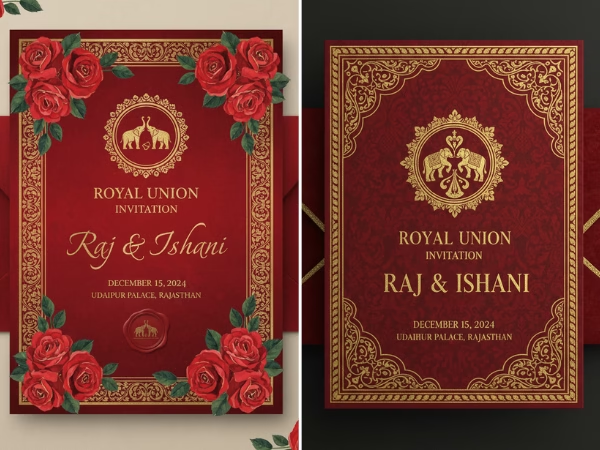




[…] You should also see this Google Gemini AI Saree Trend […]